
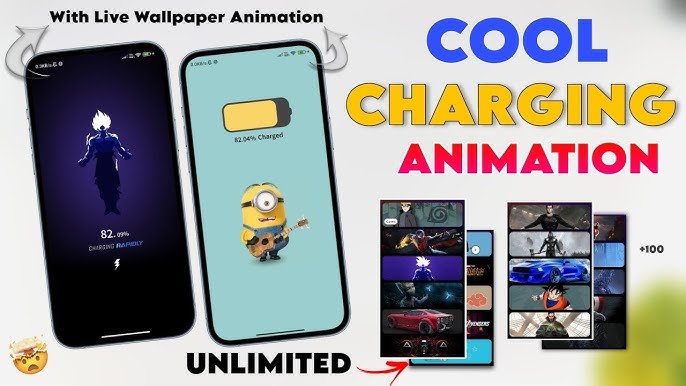
To dive deeper, we can look at this from two perspectives: how these custom charging animations actually work on a technical level (for both Android and iOS), and the marketing/psychological strategies behind this specific style of viral YouTube thumbnail.
1. How Custom Charging Animations Work
Normally, operating systems like Android and iOS have a locked, default charging screen. Third-party apps bypass or integrate with the system to display these custom, high-quality animations.
On Android (Highly Customizable)
Android allows deep system integration, making this process relatively seamless:
- System Event Triggers: Apps use a system listener that detects when the phone’s status changes to “charging” (specifically detecting the system broadcast
ACTION_POWER_CONNECTED). - Draw Over Other Apps Permission: The app requires this specific Android permission. When the charger is plugged in, the app instantly launches a full-screen overlay on top of your lock screen, replacing the default UI with the animated video.
- Battery API Integration: The app reads the device’s live battery level API to display the exact, updating percentage (like the $82.09\%$ shown in the Goku animation) styled in custom fonts.
On iOS (Workaround Required)
Apple’s iOS is much more locked down, so achieving this requires using the native Shortcuts app:
- Automation Trigger: The user must set up a personal automation in iOS Shortcuts: “When Charger is connected” $\rightarrow$ “Open App [Name of Charging App]”.
- App Launch: The moment the phone is plugged in, iOS automatically runs the shortcut, opening the third-party app in full-screen mode to play the live wallpaper animation.
2. Anatomy of the Thumbnail Strategy
This thumbnail is a textbook example of high-click-through-rate (CTR) design for tech, gaming, and customization audiences. Here is why it is highly effective:
A. The “Visual Loop” Design
The designer uses visual elements to guide your eyes in a perfect circle:
- Start (Top Right): The massive, colorful text “COOL CHARGING ANIMATION” catches your attention first.
- Middle (Left): Your eyes move to the two phone screens showing the highly recognizable characters (Goku and a Minion).
- Bottom (Center): The bold word “UNLIMITED” and the bright red arrow pull your eyes to the right.
- End (Right): You look at the massive preview list of other popular characters, proving there is something for everyone.
B. High-Contrast Color Theory
- Split Background: The background is split between a light-grey gradient and a dark-grey gradient, which makes both the light-themed Minion phone and the dark-themed Goku phone pop out perfectly without blending into the background.
- Saturated Text: Using yellow and pink text on a light background ensures the words are readable even on tiny mobile screens.
C. Leveraging “Pop Culture” Hooks
By showcasing Goku (anime), a Minion (mainstream comedy), Spider-Man, and Naruto, the creator cast a massive net. Anyone interested in any of these major franchises is highly likely to click just to see how their favorite character looks while charging.
Are you planning to create a video/content showcasing how to set up these animations, or are you looking to design a similar high-click-through-rate thumbnail for your own channel?
This image is a YouTube video thumbnail designed to promote a mobile customization app or trick that changes the standard, boring charging screen into custom, stylized animations.
Here is a breakdown of what the image is conveying:
Key Features Promoted
- Custom Charging Animations: The main hook is replacing default battery percentages with dynamic themes. The thumbnail showcases a glowing anime character silhouette (looks like Goku from Dragon Ball) on the dark screen and a Minion playing a guitar on the light screen.
- Live Wallpaper Integration: The text at the top left reads “With Live Wallpaper Animation,” suggesting these screens aren’t static images—they animate dynamically while the phone is plugged in.
- Massive Variety: The bottom right features preview cards displaying over 100+ different themes (including Naruto, Spider-Man, sports cars, and generic superhero/sci-fi aesthetics). The bold word “UNLIMITED” at the bottom reinforces that users have a huge library to choose from.
Visual Strategy & Design
- Before & After / Variety Contrast: Showing two phones side-by-side demonstrates versatility—one dark/minimalist theme vs. one bright/pop-culture theme to appeal to different tastes.
- Eye-Catching Typography: The text “COOL CHARGING ANIMATION” uses high-contrast colors (blue, yellow, and vibrant pink) against a clean white background to instantly grab a scrolling viewer’s attention.
- Click-Inducing Elements: The shocked emoji in the bottom-left corner and the bright red arrow pointing toward the menu cards are classic YouTube thumbnail techniques used to spark curiosity and drive clicks.
Hey good information